
With the Automatic Goals feature, Trackboxx can automatically detect events on your website. These events are displayed in the Goals section and can then be saved as custom conversion goals.
Benefit: You don't need to add additional code to your website for every individual goal. Instead, Trackboxx automatically detects relevant user actions, and you decide which ones should be saved as conversion goals.
What are Auto Goals?
Automatic Goals are automatically detected user actions on your website. These can include, for example:
- Clicks on buttons or specific elements
- Views of specific pages
- Downloads
- Other relevant user actions on your website
Trackboxx initially records these actions as detected live events. They are not automatically counted as conversions. A detected event only becomes a conversion goal once you save it as a goal.
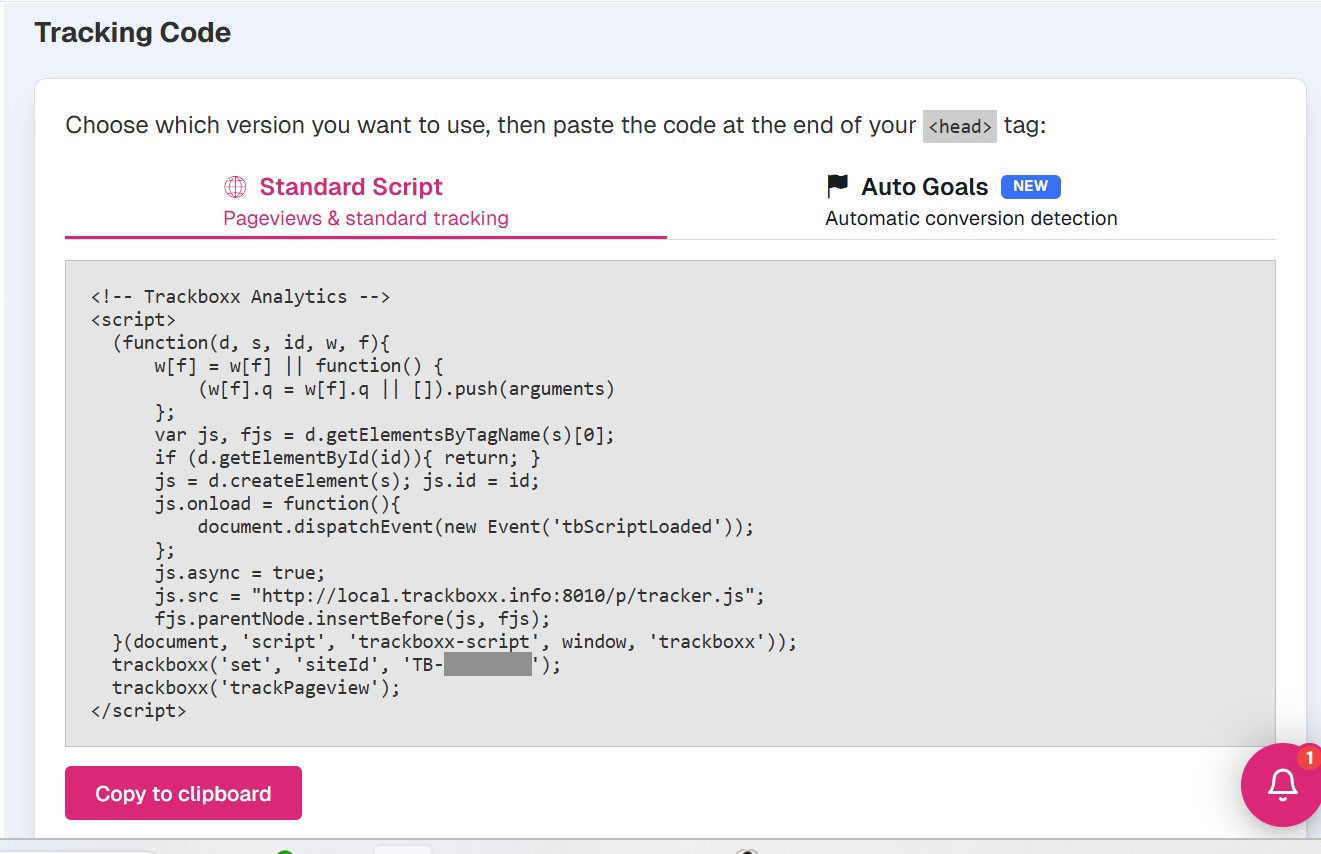
Important: To use this feature, you must use the correct tracking script. In your dashboard, under the corresponding website, you will find both the standard tracking script and the tracking script required to enable Automatic Goals.
What are Automatic Goals useful for?
Automatic Goals help you capture important user actions as conversion goals more quickly.
This is especially useful if you want to see which actions visitors perform on your website without having to manually set up each goal in advance.
You can review the automatically detected events and then decide which ones are relevant for your tracking and reporting.
Enable Automatic Goals
Open the Goals section in Trackboxx.
In the Goals section, you will now find the tab Automatically Detected Goals.
There, you can activate automatic detection. Once the feature is enabled, Trackboxx records events on your website and displays them in a list.

Create a Goal from a Detected Event
Once Trackboxx has detected events, they will appear in the list.
To create a goal from this, simply click „Save“ next to the relevant event.
In the next step, you'll have access to additional configuration options. In most cases, simply giving the goal a descriptive name and saving the event is all that's required.
Once the event has been saved, it will appear as a regular goal in the Goals module. Whenever a visitor triggers this event on your website, it will be tracked as a conversion accordingly.

Configuration of detected events
Automatically detected events can be further refined using additional conditions. For example, if you want to capture every click on a PDF file, select "Destination URL" as the selector, "contains" as the operator, and enter ".pdf" as the value.

How long are detected live events available?
Detected live events are available for up to 7 days retrospectively.
This gives you enough time to review which actions are taking place on your website and decide which ones are worth tracking as conversion goals.
Existing Custom Goals Remain Available
Your existing custom goals remain available and continue to work as before.
Automatic Goals do not replace your existing goals—they complement them. You can continue creating custom goals manually while also converting automatically detected events into conversion goals whenever needed.
Summary
With Automatic Goals, you can:
- Let Trackboxx automatically detect events
- Easily identify relevant user actions
- Create custom goals from detected events.
- Set up goals faster without adding extra code to your website.
- Review detected live events for up to 7 days retrospectively.
Automatic Goals are especially useful if you want to quickly understand which actions on your website matter most and decide which ones should be tracked as conversion goals.

 Deutsch
  English (UK)
  Français
  Italiano
  Español
  Nederlands
  Polski
  Svenska